How to Stop SOPs From Dying After You Write Them
If you run a lifestyle management company, you already know the pattern: you finally carve out time to document how things are done, you feel a wave of relief… and then a few weeks later, your team is back to asking you the same questions.
The SOPs (standard operating procedures) technically exist, but they’re not being used—or worse, they’re being used incorrectly because they’re out of date. That’s when documentation starts to feel like a waste of time.
The problem usually isn’t that your team “doesn’t care” or that you “need better people.” The problem is that most companies treat SOPs like a one-time project instead of a living operating system.
Below is a practical, repeatable way to keep SOPs updated so they stay relevant, searchable, and actually followed—without you becoming the permanent editor-in-chief of your business.
1) The real problem: SOPs get written, then quietly ignored
Most SOP efforts fail for one of two reasons:
A) The SOP is written to prove something exists (for onboarding, for compliance, for peace of mind), not to support real work.
B) The SOP is written once, but the business keeps changing.
Lifestyle management companies change constantly: client preferences evolve, vendors change, pricing changes, new services get added, and team roles shift. If your SOPs don’t have a built-in way to evolve with those changes, they become historical documents.
When SOPs become “old news,” your team stops trusting them. And when your team stops trusting them, they stop using them. That’s when everything goes back into your head.
2) Why SOPs die: 5 predictable failure points
If you want to keep SOPs updated, it helps to name what’s actually killing them. Here are the most common failure points we see in service businesses—especially concierge and lifestyle management companies.
Failure point #1: No one owns the SOP
If an SOP belongs to “the company,” it belongs to no one. When a process breaks, nobody feels responsible for updating the documentation. The owner (you) becomes the default.
Failure point #2: The SOP isn’t connected to a workflow
An SOP sitting in a folder is easy to ignore. An SOP attached to a task or workflow step is much harder to bypass. If your team can complete work without ever seeing the SOP, usage will always be inconsistent.
Failure point #3: The SOP is too long to use in real time
If the SOP reads like a manual, people won’t open it when a client is waiting. Teams need quick clarity: what to do, in what order, with what standards, and what “done” looks like.
Failure point #4: Updates require too much effort
If updating an SOP means rewriting a document, formatting it, saving it, notifying everyone, and hoping they read it—updates won’t happen. You need a lightweight update path.
Failure point #5: There’s no review rhythm
Even good SOPs drift. Vendors change. Tools change. Policies change. If there’s no scheduled review, the SOP will eventually become inaccurate, and then it becomes dangerous to follow.
3) The fix: a simple SOP lifecycle (owner, trigger, review, retire)
To keep SOPs updated, you need a lifecycle. Not a complicated one—just a clear set of rules your team can follow.
Here’s a practical SOP lifecycle that works well in lifestyle management operations.
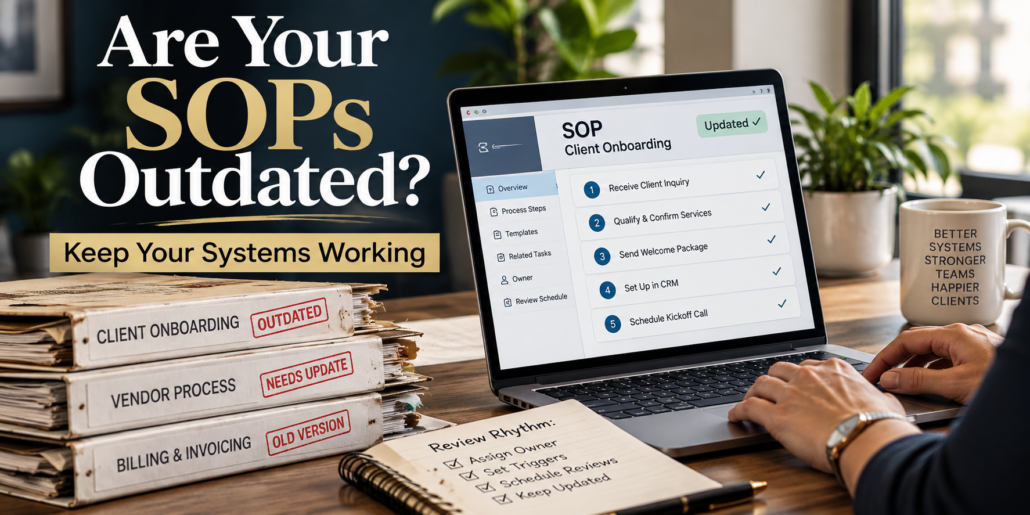
Step 1: Assign an SOP Owner (one person, one name)
Every SOP needs a single accountable owner. Not necessarily the person who does the task most often, but the person responsible for keeping the SOP accurate.
Examples:
– Client onboarding SOP owner: Client Success Lead
– Vendor onboarding SOP owner: Operations Coordinator
– Billing and invoicing SOP owner: Finance/Admin Lead
If you’re small and wearing multiple hats, you can still assign ownership—just assign it intentionally. The goal is to transfer ownership over time as your team grows.
Step 2: Define the Update Triggers (when an SOP must be reviewed)
Instead of hoping someone remembers to update documentation, define triggers that automatically require a review.
Common triggers in lifestyle management companies:
– A client complaint or service miss tied to a process
– A new vendor or vendor policy change
– A pricing/package change
– A software/tool change (even a small one)
– A new team member takes over the task
– A recurring “clarification question” shows up more than twice
When a trigger happens, the SOP owner doesn’t need to rewrite everything. They just need to confirm what changed and update the relevant step.
Step 3: Add a Review Rhythm (scheduled, not emotional)
Even with triggers, you still need a baseline review schedule.
A simple approach:
– High-change SOPs (client requests, vendor coordination, scheduling): review every 30–60 days
– Medium-change SOPs (onboarding, billing, reporting): review quarterly
– Low-change SOPs (brand standards, security policies): review every 6–12 months
This prevents the “we only fix it when it breaks” cycle.
Step 4: Create a Retire Rule (so your library doesn’t become a junk drawer)
Old SOPs create confusion. If you keep everything forever, your team won’t know what’s current.
Use a simple retire rule:
– If the process is no longer offered, archive it.
– If the process has been replaced, link to the new SOP and archive the old one.
– If the SOP hasn’t been used in 6–12 months, review whether it should be merged, simplified, or retired.
Retiring is part of keeping SOPs updated. A smaller, trusted library beats a massive, ignored one.
4) How to make SOPs usable: where they live, how they’re found, and how updates happen
An SOP lifecycle only works if your team can actually find and use the SOP in the moment.
Here are the operational standards that keep SOPs alive.
A) Put SOPs where work happens
If your team lives in a task system, your SOPs should be linked inside tasks and workflows. If your team works from a client record, SOPs should be accessible from the client workflow.
The goal: the SOP should appear at the exact moment someone needs it.
B) Use a “One-Page SOP” structure for speed
You can still have detailed references, but the primary SOP should be fast.
A strong one-page SOP includes:
– Purpose (what this process is for)
– When to use it (the trigger)
– Steps (numbered, in order)
– Standards (what “good” looks like)
– Exceptions (what to do when it’s not normal)
– Links (templates, scripts, forms, checklists)
– Owner + last updated date
When SOPs are short and scannable, usage goes up—and updates become easier.
C) Add a frictionless “Suggest an Update” path
Your best SOP improvements will come from the people doing the work.
Create a simple rule:
– If someone finds an SOP that’s unclear or wrong, they don’t fix it themselves in five different ways.
– They submit a quick update note to the SOP owner.
This can be as simple as a form, a tagged comment, or a dedicated request type. The key is that the feedback is captured and routed—so the SOP improves instead of the team improvising.
D) Build SOP updates into your weekly operations review
If you want owner-off operations, you need a weekly rhythm that keeps the business from drifting.
In your weekly ops review, include a standing agenda item:
– “SOP updates needed this week”
Then review:
– What triggered the update?
– What changed?
– Who owns it?
– When will it be updated?
– Does the workflow need to be adjusted so the SOP is used?
This turns SOP maintenance into a normal operational habit, not a heroic project.
E) Tie SOPs to training (so onboarding doesn’t depend on tribal knowledge)
When SOPs are current, onboarding becomes easier. When onboarding is easier, you stop being the bottleneck.
A practical approach:
– New team member completes the SOP + checklist
– They perform the process once with oversight
– They document any confusion as “update suggestions”
– SOP owner updates the SOP
This creates a feedback loop where onboarding improves the documentation instead of exposing how fragile it is.
5) Your next step: implement this without overwhelm
If you’re reading this and thinking, “This makes sense, but I don’t have time to build all of this,” you’re not alone.
Most business owners don’t need more information. They need the right next step and a structure that makes follow-through realistic.
At Concierge Business Solutions®, everything we offer fits into three categories—Education, Systems & Software, and Growth & Connection—because keeping SOPs updated is not just a documentation issue. It’s an operational design issue.
If you’re early in the process and you want clarity on where your business depends on you too heavily, start with the 5 Day to Freedom Challenge. It’s designed to help you identify bottlenecks and operational gaps so you know exactly what to fix first.
If you want a structured framework you can follow as you build operational independence, the 12 Steps to Freedom book reinforces the principles and gives you a roadmap.
If you’re ready to redesign your business with deeper implementation, Freedom by Design® (self-study) walks you through building long-term structure—so SOPs, workflows, and roles work together.
And if you’re at the point where you need your systems and software to support the way your company runs, implementing a purpose-built platform and proper training can be the difference between “we have SOPs” and “we operate consistently.”
The bottom line: SOPs don’t die because you didn’t try hard enough. They die because they weren’t given ownership, triggers, and a review rhythm. Put those in place, and your documentation becomes a living asset that reduces questions, improves client experience, and helps your company run without constant effort from you.
Want a clear next step to reduce owner-dependence and keep your operations consistent? Start with the 5 Day to Freedom Challenge at https://conciergebusinesssolutions.com/the-5-day-freedom-challenge/ and identify exactly where your SOPs and workflows are breaking down.